
Malware vs Spyware vs Ransomware is an important topic for businesses that depend on computers, networks, cloud applications and digital information. Although these terms are often used interchangeably, they describe different types of cybersecurity threats. Each operates differently, targets different information and can cause different levels of damage.
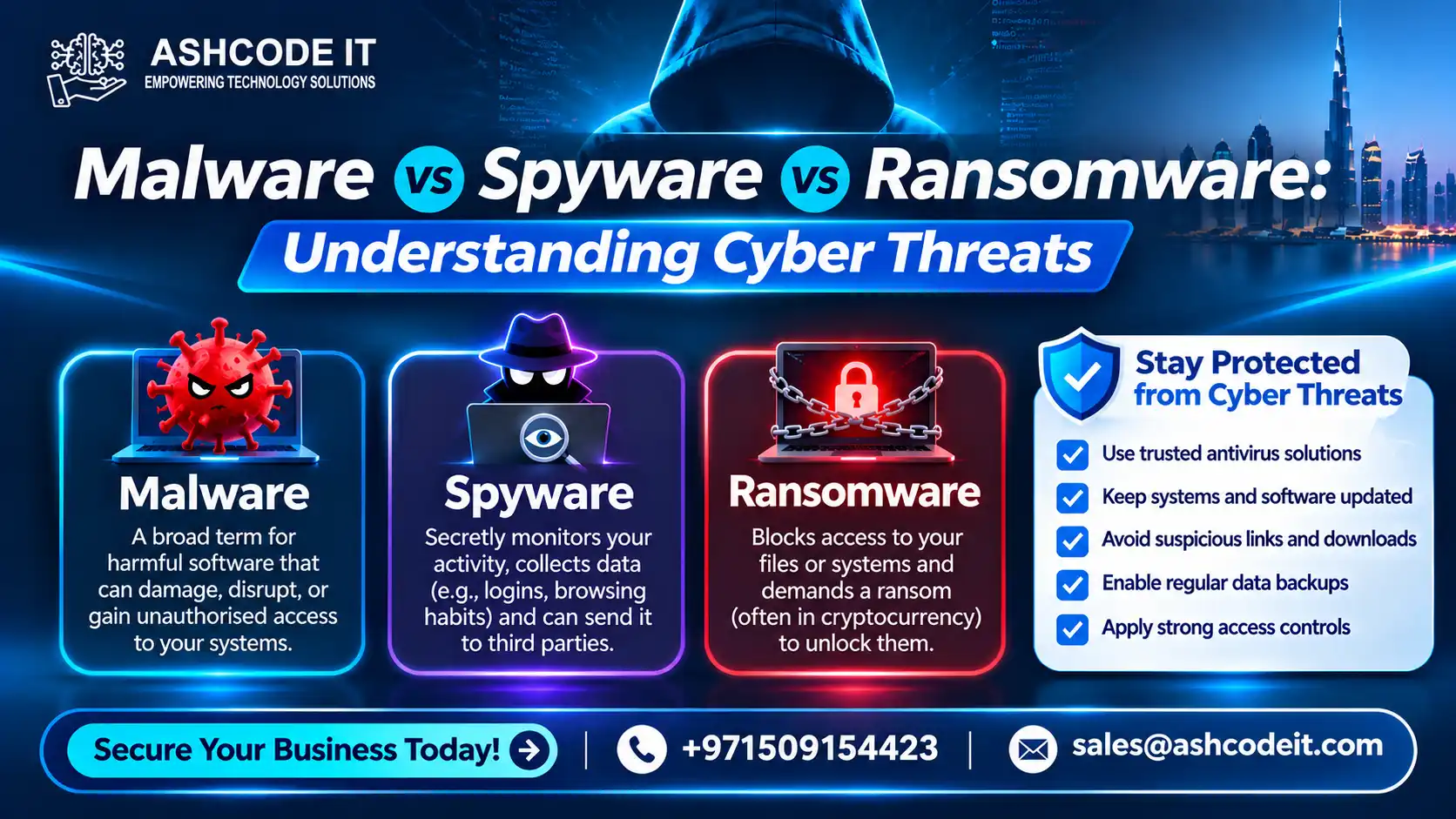
Malware is the broad category of malicious software. Spyware is designed to secretly monitor users and collect information, while ransomware prevents access to files or systems, commonly by encrypting data and demanding payment.
Understanding the differences helps businesses identify potential threats, strengthen cybersecurity controls and protect sensitive information.
Table of Contents
ToggleWhat Is Malware?
Malware, short for malicious software, refers to programs or code designed to damage systems, disrupt operations, steal information or gain unauthorised access to devices and networks.
It is an umbrella term that includes several types of cyber threats, such as:
Viruses
Worms
Trojans
Spyware
Ransomware
Rootkits
Keyloggers
Adware with malicious behaviour
Remote access malware
Malware can enter business systems through infected email attachments, malicious downloads, compromised websites, removable storage devices or exploited software vulnerabilities.
How Does Malware Work?
Malware uses different methods depending on its purpose.
For example, a Trojan may disguise itself as legitimate software to trick someone into installing it. A worm may spread across connected systems without requiring users to open an infected file. A virus may attach itself to legitimate files and spread when those files are executed.
Once installed, malware may:
Damage or delete files
Disrupt computer operations
Steal business information
Create unauthorised access
Monitor system activity
Spread to other devices
Download additional malicious programs
The impact depends on the malware type, the permissions it obtains and the security controls protecting the affected environment.
What Is Spyware?
Spyware is a type of malware designed to secretly monitor user activity and collect information without proper authorisation or awareness.
It may operate in the background while users continue using their computers normally. The collected information can include browsing activity, login credentials, personal details and other sensitive data.
Businesses can face serious risks when spyware compromises employee devices or systems used to access company applications.
How Does Spyware Work?
Spyware may be installed through malicious downloads, deceptive applications, infected attachments or compromised websites.
After installation, it may monitor activity and transmit collected information to an unauthorised party.
Common spyware capabilities include:
Recording browsing activity
Capturing keystrokes
Collecting login credentials
Monitoring application usage
Accessing sensitive information
Tracking user behaviour
Capturing screenshots in some cases
Some spyware is designed to steal credentials, while other forms focus on surveillance or collecting information for fraud.
Common Types of Spyware
Keyloggers: Record keystrokes to capture passwords, messages and other typed information.
Password Stealers: Attempt to collect saved credentials and authentication information.
Information Stealers: Collect sensitive data from browsers, applications and devices.
Browser Hijackers: Modify browser settings, redirect searches or display unwanted content. Not every browser hijacker is spyware, but some are associated with malicious information collection.
Monitoring Spyware: Secretly observes user activity and may capture screenshots or other information.
Warning Signs of Spyware
Spyware can be difficult to detect because it may operate quietly. However, some warning signs include:
Unusual device performance
Unexpected browser redirects
Unknown applications or processes
Suspicious login activity
Unfamiliar browser extensions
Unexpected changes to browser settings
Unusual network activity
Security alerts from endpoint protection software
These symptoms do not always indicate spyware. A proper security investigation is needed to identify the cause.
What Is Ransomware?
Ransomware is a type of malware that prevents users or organisations from accessing their files or systems, commonly by encrypting data and demanding payment for a decryption key.
Some ransomware operations also steal information before encrypting files. Attackers may threaten to publish the stolen data if the victim does not meet their demands. This is commonly known as double extortion.
For businesses, ransomware can interrupt daily operations, affect customer services and create significant recovery costs.
How Does Ransomware Work?
Ransomware attacks can involve several stages:
Initial access: Attackers gain access through phishing, compromised credentials, exposed remote services or exploited vulnerabilities.
Execution: Malicious code runs on an affected device or system.
Privilege escalation: Attackers may attempt to obtain higher system permissions.
Lateral movement: The threat may spread to other connected devices and servers.
Data theft: Some attackers copy sensitive information before encryption.
File encryption: Accessible files and systems may become unavailable.
Ransom demand: Attackers display instructions demanding payment.
Not every ransomware incident follows the same sequence. Early detection can help limit the damage.
Common Types of Ransomware
Crypto Ransomware: Encrypts files and demands payment for decryption.
Locker Ransomware: Locks users out of devices or operating systems.
Double Extortion Ransomware: Combines file encryption with threats to publish stolen information.
Ransomware-as-a-Service (RaaS): A criminal business model in which ransomware developers provide tools or infrastructure to affiliates who conduct attacks.
Warning Signs of Ransomware
Potential warning signs include:
Files becoming inaccessible
Unusual file extensions
Unexpected ransom notes
Sudden changes to file names
Unusual system activity
Security alerts indicating suspicious encryption behaviour
Unexpected access to shared folders
Backup files becoming unavailable
If ransomware is suspected, isolate affected systems from the network where safe to do so and contact the organisation’s IT or incident response team. Avoid deleting evidence or attempting random fixes.
Malware vs Spyware vs Ransomware: Key Differences
Although all three are cybersecurity threats, their purposes and effects are different.
| Comparison | Malware | Spyware | Ransomware |
|---|---|---|---|
| Meaning | Broad category of malicious software | Malware designed to monitor and collect information | Malware designed to deny access to data or systems |
| Main purpose | Damage, disruption, theft or unauthorised access | Secret monitoring and information collection | Extortion through encryption or access restriction |
| Common behaviour | Varies by malware type | Tracks activity and gathers data | Encrypts files or locks systems |
| Data theft | Possible | Common objective | May occur before encryption |
| User awareness | May be visible or hidden | Usually designed to remain hidden | Often becomes obvious when access is blocked |
| Business impact | Depends on the malware | Privacy and credential exposure | Operational disruption and data unavailability |
| Prevention | Layered security controls | Endpoint protection and safe application practices | Security controls, backups and incident readiness |
The most important distinction is that spyware and ransomware are both types of malware. Malware is the broader category, while spyware and ransomware describe specific malicious functions.
How Do These Cyber Threats Enter Business Networks?
Malware, spyware and ransomware can enter organisations through several common attack paths.
1. Phishing Emails
Attackers send emails that appear to come from trusted companies, colleagues or service providers. Messages may contain malicious attachments or links to fraudulent websites.
An employee who opens an attachment or enters credentials on a fake login page may expose the organisation to an attack.
2. Malicious Downloads
Software downloaded from untrusted websites may contain malicious code. Fake applications, cracked software and unofficial installers are common risks.
3. Unpatched Software
Attackers may exploit known vulnerabilities in outdated operating systems, applications, servers and network devices.
Regular patch management helps reduce exposure to vulnerabilities for which security updates are available.
4. Compromised Websites
Some websites may be compromised to distribute malicious downloads or redirect visitors to harmful pages.
5. Weak or Stolen Credentials
Attackers may use stolen passwords or weak authentication to access business systems, remote services and cloud applications.
6. Infected Removable Devices
USB drives and other removable storage devices can introduce malicious files into business computers when connected.
How Can Businesses Protect Themselves?
Protecting business systems requires multiple security controls working together. No single product can prevent every malware, spyware or ransomware attack.
Endpoint Protection and EDR
Endpoint protection software helps detect and block malicious files, suspicious applications and known threats.
Endpoint Detection and Response (EDR) adds monitoring and investigation capabilities. It can help security teams identify suspicious endpoint behaviour and respond to potential incidents.
Next-Generation Firewalls
Next-generation firewalls help control network traffic and can provide features such as application awareness, intrusion prevention and threat filtering.
They can help restrict unauthorised connections and reduce exposure to malicious network activity.
Email Security
Email security solutions can detect suspicious attachments, malicious links, impersonation attempts and spam.
Businesses should combine technical email protection with employee awareness training.
Multi-Factor Authentication
Multi-factor authentication (MFA) adds another verification step beyond a password. It can reduce the risk of unauthorised access when credentials are stolen.
MFA should be prioritised for email, remote access, cloud platforms and privileged accounts.
Patch Management
Regular updates help address known software vulnerabilities.
Businesses should maintain an inventory of devices and applications, prioritise security updates and verify that important systems are patched.
Data Loss Prevention
Data Loss Prevention (DLP) solutions help organisations monitor and control how sensitive information is accessed, transferred or shared.
DLP can support protection against unauthorised data transfers and certain information theft scenarios.
Backup and Disaster Recovery
Backups are essential for recovering business information after ransomware attacks, hardware failures or accidental deletion.
Good practices include:
Maintaining multiple backup copies
Keeping at least one copy offline or immutable
Restricting access to backup systems
Encrypting backup data
Testing restoration procedures
Monitoring backup jobs
Documenting recovery responsibilities
A backup strategy should be tested regularly rather than assumed to be working.
Security Awareness Training
Employees should understand how to identify phishing messages, suspicious downloads, unusual login requests and unsafe links.
Regular training helps reduce the likelihood of users unintentionally introducing threats into business systems.
What Should a Business Do After a Malware or Ransomware Attack?
A quick and organised response can help limit the impact of a cybersecurity incident.
Step 1: Identify the Affected Systems
Determine which computers, servers, accounts and network resources may be compromised.
Step 2: Isolate Affected Devices
Disconnect affected devices from wired and wireless networks where appropriate. This can help limit further spread. Follow the organisation’s incident response procedures and avoid actions that could destroy important evidence.
Step 3: Contact IT and Security Teams
Notify the internal IT department or qualified incident response provider. Record relevant alerts, messages and system activity.
Step 4: Secure Accounts
Investigate potentially compromised credentials. Reset affected passwords from a clean device and revoke suspicious sessions or access tokens where necessary.
Step 5: Investigate the Cause
Identify how the threat entered the environment and whether it accessed other devices, accounts or sensitive information.
Step 6: Restore Systems Safely
Remove malicious components, address the initial security weakness and restore affected systems from verified backups where appropriate.
Step 7: Review and Improve Security
After recovery, review security controls, update response procedures and provide additional employee training.
Organisations should also assess whether the incident triggers legal, regulatory or contractual notification obligations.
Malware vs Spyware vs Ransomware: Which Is More Dangerous?
There is no universal answer because the impact depends on the attack, the affected systems and the information involved.
Malware can cause different types of damage, from disrupting a single computer to compromising an entire network.
Spyware can expose sensitive information, credentials and business activity without immediately interrupting operations.
Ransomware can make business data and systems unavailable, potentially causing significant operational disruption.
For some organisations, spyware may create serious privacy and financial risks. For others, a ransomware incident may cause greater immediate disruption. All three deserve attention as part of a comprehensive cybersecurity strategy.
How Ashcode IT Supports Business Cybersecurity in Dubai
Businesses need appropriate security controls to protect computers, servers, networks and sensitive information against malicious software.
Ashcode IT, based in Dubai, UAE, provides IT infrastructure and cybersecurity services to support organisations in strengthening their technology security.
Its services include:
Endpoint protection solutions
Firewall solutions
Network security
Data Loss Prevention
Backup and disaster recovery
IT infrastructure monitoring
Patch management support
Managed IT support
Ashcode IT helps businesses review their IT security environment and implement suitable technical measures based on their requirements.
For cybersecurity and IT infrastructure support:
Phone: +971 50 915 4423
Email: [email protected]
Website: https://ashcodeit.com/
Frequently Asked Questions
What is the main difference between malware, spyware and ransomware?
Malware is the broad category of malicious software. Spyware secretly monitors users and collects information, while ransomware blocks access to files or systems, commonly through encryption and ransom demands.
Is spyware a type of malware?
Yes. Spyware is a type of malware designed to monitor activity and collect information without proper authorisation.
Is ransomware more dangerous than spyware?
Both can cause serious damage. Ransomware can interrupt business operations by making files unavailable, while spyware can quietly expose sensitive information and credentials. The impact depends on the incident.
Can malware spread through email?
Yes. Malicious email attachments and links can deliver malware or direct users to fraudulent websites. Email filtering and employee awareness training can reduce this risk.
Can antivirus software detect spyware and ransomware?
Modern endpoint protection products can detect many known malware threats and suspicious behaviours. However, no product guarantees complete protection. Businesses should combine endpoint security with patching, MFA, backups and monitoring.
How can businesses prevent ransomware attacks?
Businesses should use endpoint protection, MFA, email security, patch management, restricted access and tested offline or immutable backups. Incident response planning is also important.
Can ransomware infect a network through one computer?
Yes. If attackers compromise one computer, they may attempt to access other devices and shared resources, depending on network permissions and security controls.
What should I do if my computer is infected with spyware?
Disconnect the affected device from the network if appropriate, avoid entering sensitive credentials and contact IT support. The device should be investigated and cleaned using trusted security tools.
What is the best protection against malware?
There is no single solution. A combination of endpoint protection, firewall security, email filtering, MFA, patch management, employee training and regular backups provides stronger protection.
Final Thoughts
Understanding Malware vs Spyware vs Ransomware helps businesses recognise how different cyber threats operate and why they require appropriate security measures.
Malware is the broad category of malicious software, spyware focuses on secret monitoring and information collection, and ransomware aims to deny access to data or systems for extortion.
Businesses in Dubai should use a layered cybersecurity approach that includes endpoint protection, network security, access management, employee awareness, regular updates and tested backups. Identifying risks early and maintaining an incident response plan can help reduce the impact of cyberattacks.

Senior SEO Specialist | WordPress SEO Expert | Content Strategist | Technical SEO Consultant
With over 5 years of experience in Search Engine Optimization (SEO), I specialize in helping businesses improve their online visibility, generate qualified organic traffic, and achieve sustainable search engine rankings. My expertise covers every aspect of SEO, from technical optimization and keyword research to content strategy, on-page SEO, and website performance improvements.
As a Senior SEO Specialist at Ashcode IT, I work closely with businesses across Dubai, the UAE, and international markets to build search-focused websites that deliver measurable results. I have extensive experience optimizing WordPress websites using industry-leading tools such as Rank Math SEO, Google Search Console, Google Analytics 4, Google Tag Manager, Microsoft Clarity, and Google Business Profile.
My core expertise includes:
• Technical SEO Audits• On-Page SEO Optimization• Keyword Research & Competitor Analysis• AI Search Optimization (AEO & GEO)• Content Strategy & SEO Copywriting• WordPress SEO & Performance Optimization• Local SEO & Google Business Profile Optimization• Core Web Vitals & Website Speed Optimization• Structured Data (Schema Markup)• Internal Linking & Site Architecture• Link Building Strategy• E-commerce SEO• SEO Reporting & Analytics
Beyond traditional SEO, I specialize in creating AI-optimized content that performs well across modern search platforms, including Google AI Overviews, ChatGPT, Gemini, Claude, and Perplexity. My content strategy focuses on answering real user questions, improving topical authority, and increasing visibility in AI-powered search experiences.
I have written and optimized hundreds of SEO-focused landing pages, service pages, and blog articles across industries including:
Information Technology (IT)
Managed IT Services
Cybersecurity
Cloud Computing
CCTV & Security Solutions
Network Infrastructure
Structured Cabling
AV & Event Technology
Laptop & IT Equipment Rentals
Business Technology Solutions
My approach combines technical expertise with data-driven decision-making to create websites that not only rank well but also provide an excellent user experience. I continuously stay updated with Google’s algorithm changes, emerging SEO trends, and AI-driven search developments to ensure every strategy follows current best practices.
Whether it’s improving technical SEO, building topical authority, optimizing WordPress websites, or developing high-performing content strategies, my goal is to help businesses strengthen their online presence and achieve long-term organic growth.